Updated: November 2026
AI automation for small business uses AI tools to handle repeated work such as customer replies, lead follow-ups, reminders and reports. Start with one simple workflow, keep a person to review important messages, and measure the time it saves.
Asaadhya AI is a digital marketing and AI automation agency in Hyderabad. We set up practical automations for small and local businesses. This guide explains what to automate first, what it can cost you in time and upkeep, and what can go wrong.
What is AI automation and how does it work?
AI automation connects your business tools and uses AI to complete a task from start to finish with less manual work.
Most automations follow three steps:
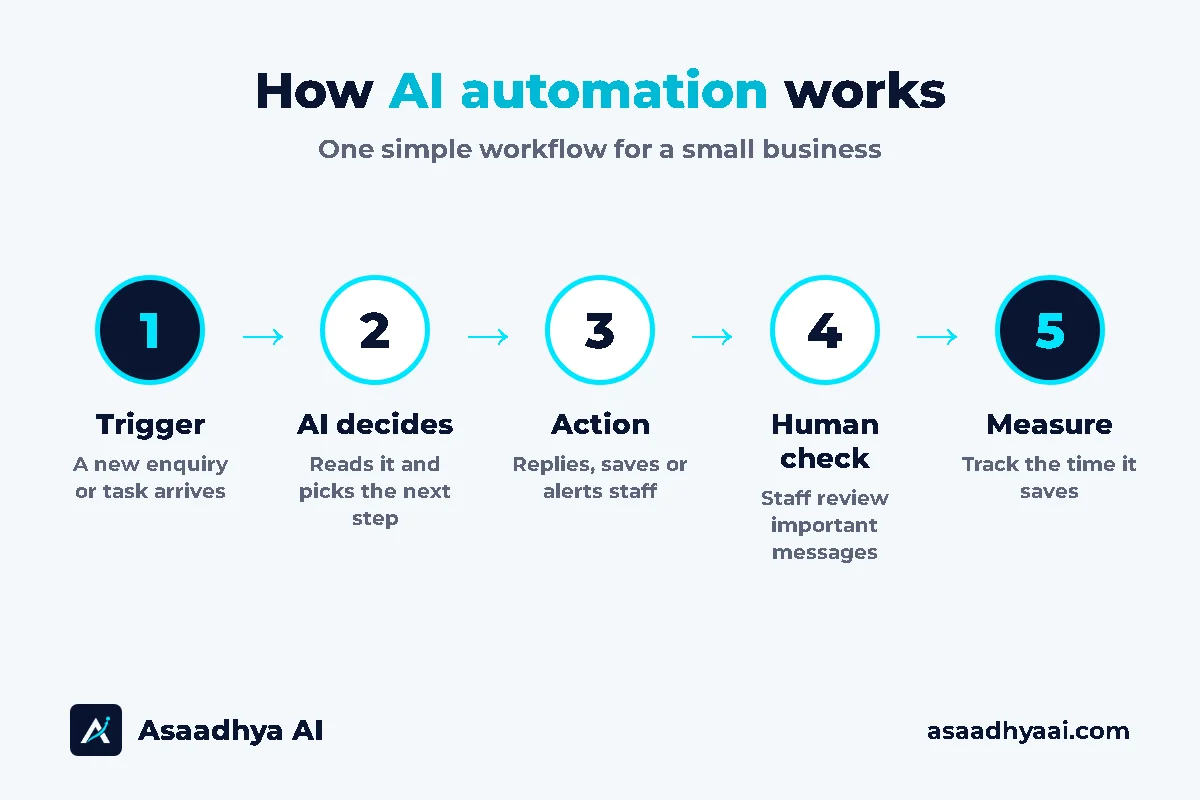
- Trigger – something happens, such as a new enquiry on your website.
- AI decision – the AI reads the message and decides what the customer needs.
- Action – the system sends a reply, updates a Google Sheet or alerts your staff.
For example, a customer asks about your opening hours on WhatsApp. The system reads the question, sends the correct timings and saves the lead. If the customer asks something unusual, the chat goes to your staff.
Plain automation follows fixed rules. AI automation can also understand everyday language, sort messages and draft replies.
How can small businesses use AI automation?
Small businesses can use AI automation to reply faster, follow up on every lead, reduce data entry and keep routine work moving.
The most useful areas are:
- Customer replies. Answer common questions outside office hours.
- Lead follow-up. Save each enquiry and remind your team to call back.
- Reminders. Send appointment and payment reminders on time.
- Admin work. Move details from forms and messages into a sheet or CRM.
- Reports. Collect numbers into one regular summary.
Many small businesses are already testing this. In an OECD survey of over 5,000 small and medium businesses in seven countries, 31% said they use generative AI. India was not part of that survey, so treat it as a general signal.
What are examples of AI automation for small business?
Common examples include lead capture, appointment booking, follow-ups, invoice reminders and regular reports.
The table below shows sample ideas. Your setup will depend on your business and tools.
| Business need | Sample automation | Benefit |
|---|---|---|
| Missed enquiries | Save WhatsApp and website leads in one sheet | Fewer lost leads |
| Repeated questions | Answer timings, location and service questions | Staff get time back |
| Clinic bookings | Book appointments on WhatsApp and send reminders | Less front-desk work |
| Real estate leads | Ask budget and location, then alert the sales team | Faster callbacks |
| Unpaid invoices | Send reminders to customers who agreed to receive them | Steadier follow-up |
| Weekly numbers | Collect leads and sales into one summary | Less manual reporting |
| Telugu customers | Offer English and Telugu reply options | Easier conversations |
For businesses that sell through chat, start with our guide to WhatsApp automation in Hyderabad.
What should a small business automate first?
Automate one repeated, simple and low-risk task first, ideally one that happens every day and follows the same steps.
Use this quick check. A task is a good first choice if:
- It happens often.
- The steps are usually the same.
- A small mistake is easy to fix.
- You can see the result clearly.
Good first tasks are saving new leads, sending appointment reminders and answering standard questions. Leave pricing decisions, complaints, legal matters and medical advice with a person.
How do you start AI automation on a limited budget?
Start with one workflow, use the tools you already have, test it with real examples, then expand only after it works.
- List your repeated tasks. Track them for one week.
- Pick one task. Choose the simplest task with the clearest benefit.
- Draw the steps. Write what starts the task, what happens next and when a person should step in.
- Connect your tools. Workflow tools such as n8n can connect forms, sheets, email and other apps.
- Test before launch. Try normal messages, unclear messages and failed connections.
- Measure the result. Compare the time spent before and after.
Do not automate everything at once. One reliable workflow is more useful than five that nobody checks.
How much does AI automation cost, and is it worth it?
The cost depends on the number of workflows, the tools you connect, your message volume and the support you need. It is worth it when the time saved is greater than the cost of running it.
Business owners usually ask three questions: does it really help, how much time or money does it save, and what about maintenance?
| What affects the cost | Why it matters |
|---|---|
| Number of workflows | Each one needs planning and testing |
| Tools and integrations | More connections need more setup |
| AI and message usage | Some services charge based on use |
| Languages | English and Telugu flows need separate testing |
| Maintenance | Tools and business details change over time |
In our own workflow, the first setup took about one day. After that, the workflow saves time every month and runs the same steps consistently. Your setup time and savings will be different.
Before you start, write down how much time the task takes today. This gives you a real number to compare later. For chat-based projects, read what decides WhatsApp chatbot cost in India.
AI automation vs hiring staff: which is better for a small business?
AI automation is better for repeated, simple tasks, while staff are better for work that needs judgement, care or selling. Most small businesses get the best results by using both.
| Task | AI automation | Staff |
|---|---|---|
| Replying to common questions | ✅ Fast, any time | Takes time from other work |
| Saving leads and sending reminders | ✅ Same steps every time | Can be forgotten on busy days |
| Handling complaints | Not suitable | ✅ Needs care and judgement |
| Selling and building relationships | Not suitable | ✅ Needs a personal touch |
| Medical, legal or pricing decisions | Not suitable | ✅ Needs a qualified person |
Automation does not replace your team. It takes routine work off their plate, so they can spend more time with customers.
A simple way to decide: if a task happens often and follows the same steps, try automating it. If it needs a decision or a conversation, keep it with a person.
Is AI automation safe for small businesses?
AI automation can be safe when you limit the data it uses, keep a person for important decisions and set up alerts for failures.
We learned this from our own setup. A connection sometimes dropped when we started. We added a retry step and a notification, so the workflow tries again and tells us when something needs attention.
Follow these basics:
- Collect only what you need. Avoid sensitive details unless they are necessary.
- Control access. Let only the right people see customer data.
- Keep human review. Check important messages before they go out, or hand them to staff.
- Plan for failure. Add retries, alerts and an easy way to reach a person.
- Check the answers. AI can be wrong, so test it and review it regularly.
India’s Digital Personal Data Protection law applies to how personal data is handled. Please check your process with your own legal or compliance adviser.
Frequently asked questions
Is AI automation the same as an AI agent?
Not exactly. AI automation usually follows a planned workflow. An AI agent can choose more of its own steps to reach a goal. Small businesses should usually start with a simple workflow.
What is the difference between AI, automation, a chatbot and a CRM?
AI understands and generates information. Automation runs tasks. A chatbot talks to customers. A CRM stores customer details and follow-ups. One system can use all four.
Does AI automation need maintenance?
Yes. Business details, tools and connections can change. Someone should check results, review failed runs and update the workflow when needed.
Does AI automation require coding?
Not always. Many workflows can be built with visual tools. Complex connections may need technical help.
Which AI is best for a small business?
There is no single best tool. Choose based on the task, your budget, the data involved and how well it connects with your current tools.
Can AI automation help with social media and digital marketing?
Yes. It can help draft posts, sort enquiries and collect reports. A person should review public content before it goes live.
Will customers know they are talking to a bot?
It is best to tell them. Be clear that it is an automated assistant and give an easy way to reach a person.
What do AI automation services include?
A service usually includes finding the right task, building the workflow, connecting tools, testing and support after launch. See our digital marketing and AI automation services.
Get help choosing your first automation
Tell us one repeated task in your business, and Asaadhya AI will suggest what to automate first. We work with businesses in Hyderabad and across India.